Pricing
One plan, everything included
No tiers and no add-ons. You get the whole of LightMock Pro, from the first design to the signed job.
LightMock Pro
$50per month, billed monthly
- 200 AI night renders a month, and unused renders roll over up to 300
- Unlimited customers
- The editor: strands, icicles, nets, garland and decorations drawn on the customer’s photo
- Preset designs
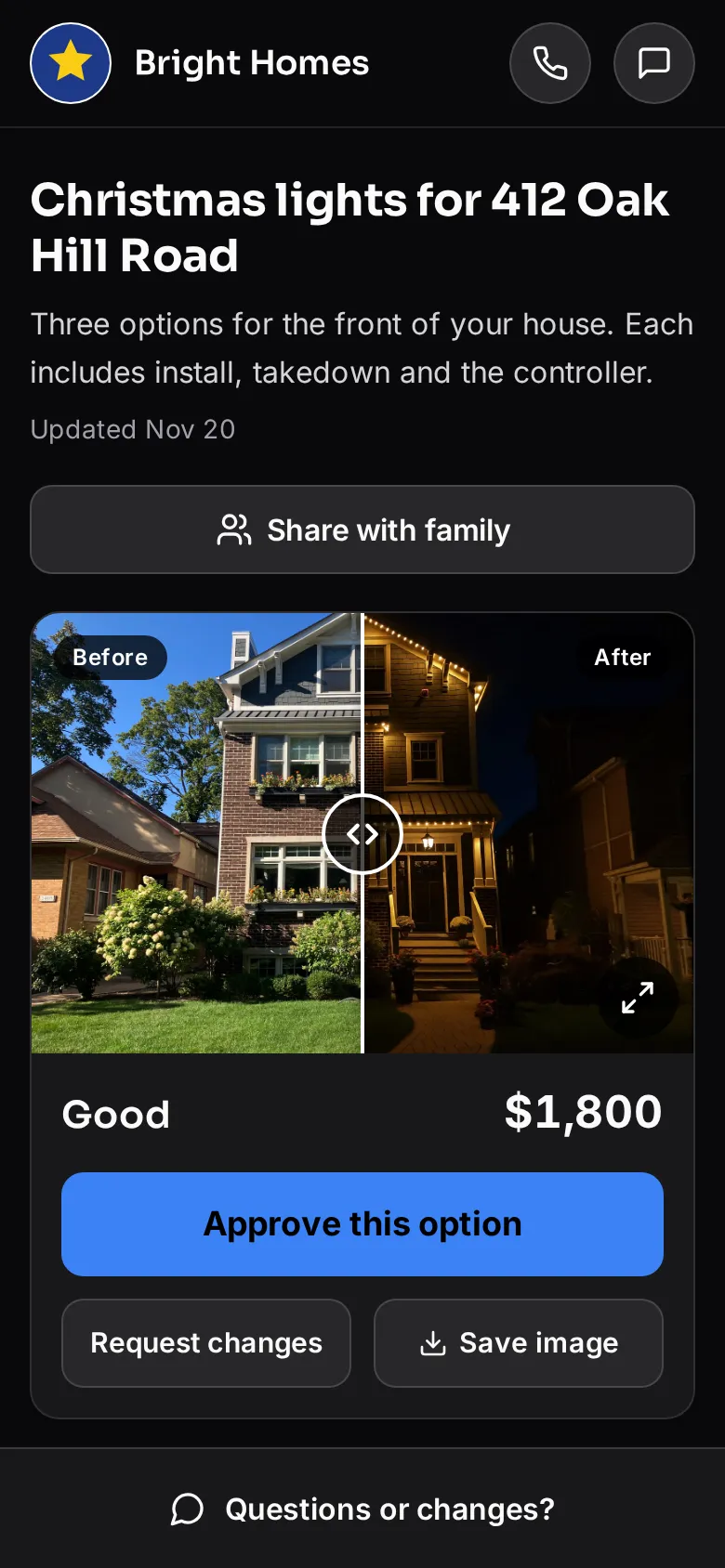
- Good, Better and Best proposals with your prices and logo
- Share links the homeowner approves from their phone, plus a family link
- Activity tracking
- Cancel any time
Free trial
Try it for 5 days, free
A card is needed to start. Nothing is charged during the 5 days, and if you cancel before day 5 you are never charged.
5
days
to try everything
5
AI renders
of your own customers’ houses
3
customers
at most, during the trial
What you get
Everything from the first design to the signed job
Every feature is included in the plan.
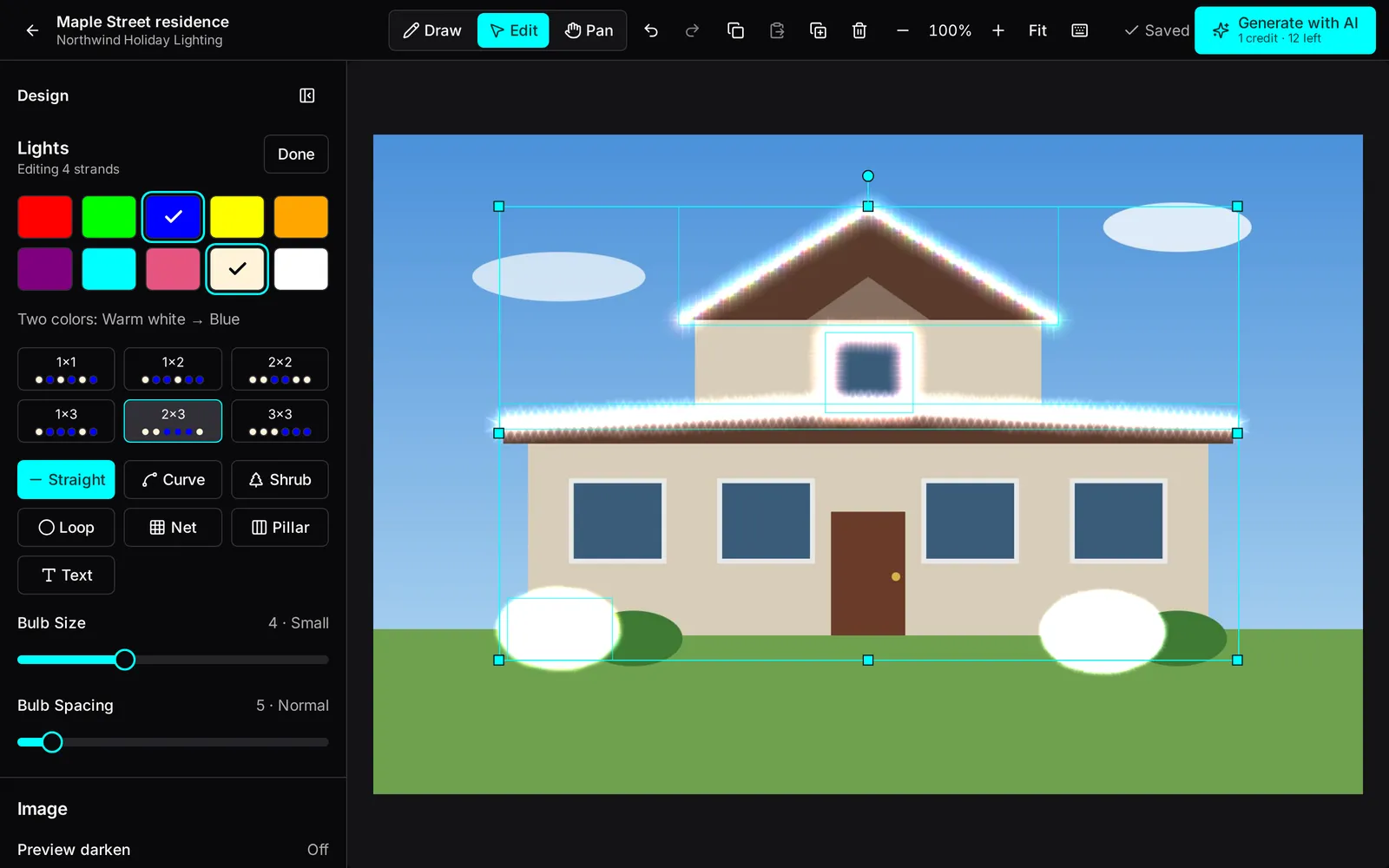
Draw the lights on their photo
Straight runs, curves and shrubs, in any of ten colors and patterns. Drawing and editing are free and unlimited.
Icicles, nets, garland and pillars
Hang icicle drops, fill an area with a net of lights, add greenery garland (lit or unlit) and wrap pillars.
Wreaths and bows
Place wreaths and bows at the sizes you actually sell, and they go into the night render with the lights.
Linked styles
Link strands to one named style, change the look once, and every linked strand follows.
Crop and rotate the photo
Trim a photo or turn a sideways one, and your lights stay on the same spots of the house.
AI night renders
Turn your design into a realistic night shot of the house, with the lights where you drew them and in the colors you chose.
Preset designs
Pick a curated preset and let the AI place the lights, as a quick alternative to drawing your own.
Customers in one list
Every customer is a house photo. Search by name or address, filter by status, and call, text or open the address in maps.
Good, Better and Best proposals
Build options from your designs, set your prices, break a price down into line items, and add your terms.
Your logo and brand
Keep your logo, company name, phone, license line, brand color and default terms in one business profile.
Share links for the homeowner
Send a link by text or copy it. The homeowner views the proposal, sends feedback and approves from their phone, with no account.
A family link
A view-only link the homeowner can pass to family, so everyone sees the same proposal.
Activity tracking
One feed shows when proposals are opened, approved or questioned, and which customers need a follow-up.
Job status
Move each job from lead through sent, approved, scheduled and installed, and set any status by hand.
Questions
Good to know before you start
- What counts as a render?
- One AI night render of a design, whether you drew it in the editor or started from a preset. Drawing and editing cost nothing. A render is counted once its result is saved.
- Do unused renders roll over?
- Yes. You get 200 renders a month, and the ones you don't use carry over to the next month, up to 300 in total.
- What happens when the trial ends?
- The trial lasts 5 days, with 5 renders and up to 3 customers. Nothing is charged during those days. If you haven't cancelled by the end, the plan starts at $50 a month.
- Can I cancel?
- Yes, any time, including during the trial. After a subscription ends, links you have already sent keep working for 7 days, and subscribing again restores them.
- Do homeowners need an account?
- No. They open the link you send them, on their phone, and can view, send feedback and approve without signing up.
- I have a larger team.
- Email sales@lightmock.com and tell us about your team.
About
Built for lighting installers
LightMock Pro is for people who hang holiday and permanent lighting for a living. It lets you show a homeowner their own house lit up at night, then send a priced proposal they can approve from their phone. You design the lights, the AI renders the night view, and one tool keeps the customer, the proposal and the follow-up together.